
How to Use GrowthKit: A Complete Guide to the Child Growth Tracker
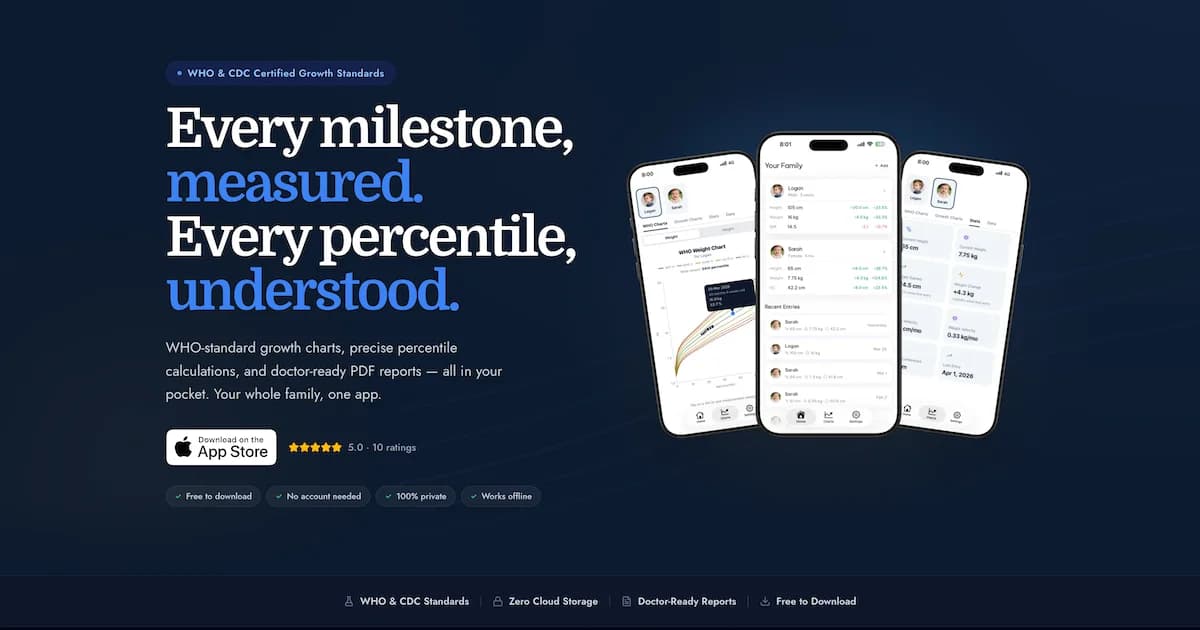
GrowthKit makes it easy to track your child's growth against WHO/CDC standards between doctor visits. This guide walks you through every feature so you can get the most from the app.
 Srivishnu RamakrishnanApril 9, 20269 min read
If you've ever squinted at the growth chart on the wall of your pediatrician's office wondering what the percentile lines actually mean — or wished you had your baby's last three weights in front of you during an appointment — GrowthKit was built for exactly that. It's a simple, private, beautiful way to track your child's growth at home and bring clear data to every doctor visit.
Here's a complete walkthrough of everything the app can do.
Getting Started: Setting Up Your First Profile
When you first open GrowthKit, you'll be prompted to create a profile for your child. All you need is:
- Your child's name
- Their date of birth
- Their sex (used for sex-specific WHO/CDC growth charts)
- An optional profile photo from your camera roll
Once a profile is created, you'll land on the dashboard — showing your child's current stats and an empty chart waiting for measurements.
Logging Measurements
Tapping the + button lets you log:
- Weight (kg or lbs/oz)
- Height / Length (cm or inches)
- Head circumference (cm or inches) — ideal for infants under 2
Each measurement is timestamped. You can edit the date if you're entering a historical measurement. GrowthKit instantly calculates and displays the WHO/CDC percentile for that data point the moment you save it.

GrowthKit · Free for iPhone
Track every milestone, instantly.
Understanding the Charts
GrowthKit's charts are the centrepiece of the app — and they're built on the same data your pediatrician uses.
| Chart | Age Range | Reference Data | What It Tells You |
|---|---|---|---|
| Weight-for-age | Birth to 10 years | WHO (0–2y), CDC (2–10y) | Whether weight is proportionate for your child's age |
| Height/length-for-age | Birth to 19 years | WHO (0–2y), CDC (2–19y) | Whether height is proportionate for your child's age |
| Head circumference | Birth to 5 years | WHO standards | Whether brain growth is on track (most relevant under 18 months) |
| BMI-for-age | 2 years and older | CDC | Weight relative to height; calibrated for age and sex |
| Weight velocity | Any age with 2+ data points | Derived | How fast your child is gaining weight over time |
| Height velocity | Any age with 2+ data points | Derived | How fast your child is growing taller over time |
Source: GrowthKit app documentation; WHO Child Growth Standards; CDC Growth Charts
GrowthKit uses WHO LMS (Lambda-Mu-Sigma) Box-Cox calculations — the same method used in clinical software
Reading the Percentile Bands
Each chart shows reference bands at the 3rd, 10th, 25th, 50th, 75th, 90th, and 97th percentiles. Your child's plotted points show exactly where they fall — not just "somewhere between the 25th and 50th" but a precise figure like "72nd percentile."
What matters most is not the number itself but consistency: a child consistently at the 15th percentile is growing normally. The concern arises when the curve changes — crossing two or more major percentile lines upward or downward.
The Stats Dashboard
The dashboard gives you an instant snapshot for each profile:
- Latest weight and height with the date they were logged
- Current percentile for each measurement
- Change since last entry — so you can see "+0.4 kg since 3 weeks ago" at a glance
- Age calculated precisely from birth date
This single screen gives you everything you'd want to have at hand when speaking with your pediatrician.
Multiple Profiles: The Whole Family in One App
GrowthKit supports unlimited profiles. Add a second child, a third — or even track an adult family member's weight journey. Each profile is completely independent with its own measurement history, charts, and settings.
Switching between profiles is instant and visible from any screen in the app. If you have siblings with different growth patterns, you can flip between them during a conversation with your doctor without losing your place.
Exporting a PDF Report
One of the most practically useful features in GrowthKit is one-tap PDF generation.
Tap the export icon from any profile. GrowthKit instantly generates a professional PDF containing:
- Your child's name, age, sex, and profile photo
- Complete measurement history table with all dates, measurements, and percentiles
- Embedded WHO/CDC growth charts showing your child's curve
- BMI trend (for children 2+)
- Growth velocity summary
The PDF is generated on your device and shared via the iOS share sheet — email it to your pediatrician before an appointment, AirDrop it to your tablet, save it to Files, or print it directly from your phone.
Measurement Reminders
GrowthKit can remind you to log measurements on a preset schedule:
- Daily, weekly, or monthly — choose what fits your routine
- Custom time — default 8pm, adjust to whenever you typically weigh your baby
- Day preference — set the day of week (weekly) or day of month (monthly)
Reminders are local notifications — no internet needed, and no data is sent anywhere.
Flexible Tracking Per Profile
Each child's profile can be customised:
- Toggle height, weight, or head circumference tracking on or off
- For older children who have stopped growing: set a fixed height once and track weight only
- Perfect for adults in the family you also want to track
Privacy and Data
GrowthKit takes an uncompromising approach to privacy:
- All data is stored locally on your device only — no cloud, no servers
- No account required — there's no sign-up, no email, no password
- Works completely offline
- No ads, no data selling — the app has a single business model: the app itself
Your child's growth history is yours. It lives on your phone, it's private, and it's never shared.
Baby Weight Percentile Calculator
Get an instant WHO percentile for your baby's weight by age — the same calculation method used in GrowthKit.
Getting the Most Out of GrowthKit
A few tips for getting maximum value:
- Enter all historical data first — the chart is most useful when it shows a curve, not a single point
- Measure consistently — use the same scale at the same time of day (morning, before a feed) for the most comparable data
- Log after every doctor visit — well-child visits are the most accurate measurements; record them the same day
- Review the velocity charts — they show patterns that the standard chart can hide
- Generate the PDF before every appointment — arriving with data in hand transforms the conversation
GrowthKit is free on the App Store. Search "GrowthKit" on your iPhone to download.
Frequently Asked Questions
Is GrowthKit free?
Yes, GrowthKit is free to download from the App Store. The core growth tracking features — including WHO percentile charts, multiple child profiles, and measurement logging — are available without charge.
Does GrowthKit use WHO or CDC growth charts?
GrowthKit uses WHO Child Growth Standards for children from birth to 2 years, then transitions to CDC growth charts for ages 2 and older. This matches the approach recommended by the American Academy of Pediatrics: WHO data for infants and toddlers, CDC for older children.
Is my child's data private in GrowthKit?
Yes. GrowthKit stores all data locally on your iPhone only. Nothing is sent to any server, no account is required, and the app works completely offline. Your child's measurements never leave your device.
Can I track more than one child in GrowthKit?
Yes. GrowthKit supports unlimited profiles — one per family member. Each profile has its own name, photo, birth date, and independent growth history. Switching between profiles is instant from any screen.
Medical Disclaimer
This article is for informational purposes only and does not constitute medical advice. Always consult your child's pediatrician or a qualified healthcare provider for any health-related concerns.Free Tools
More Growth & Percentiles
Free Tools
More Growth & Percentiles